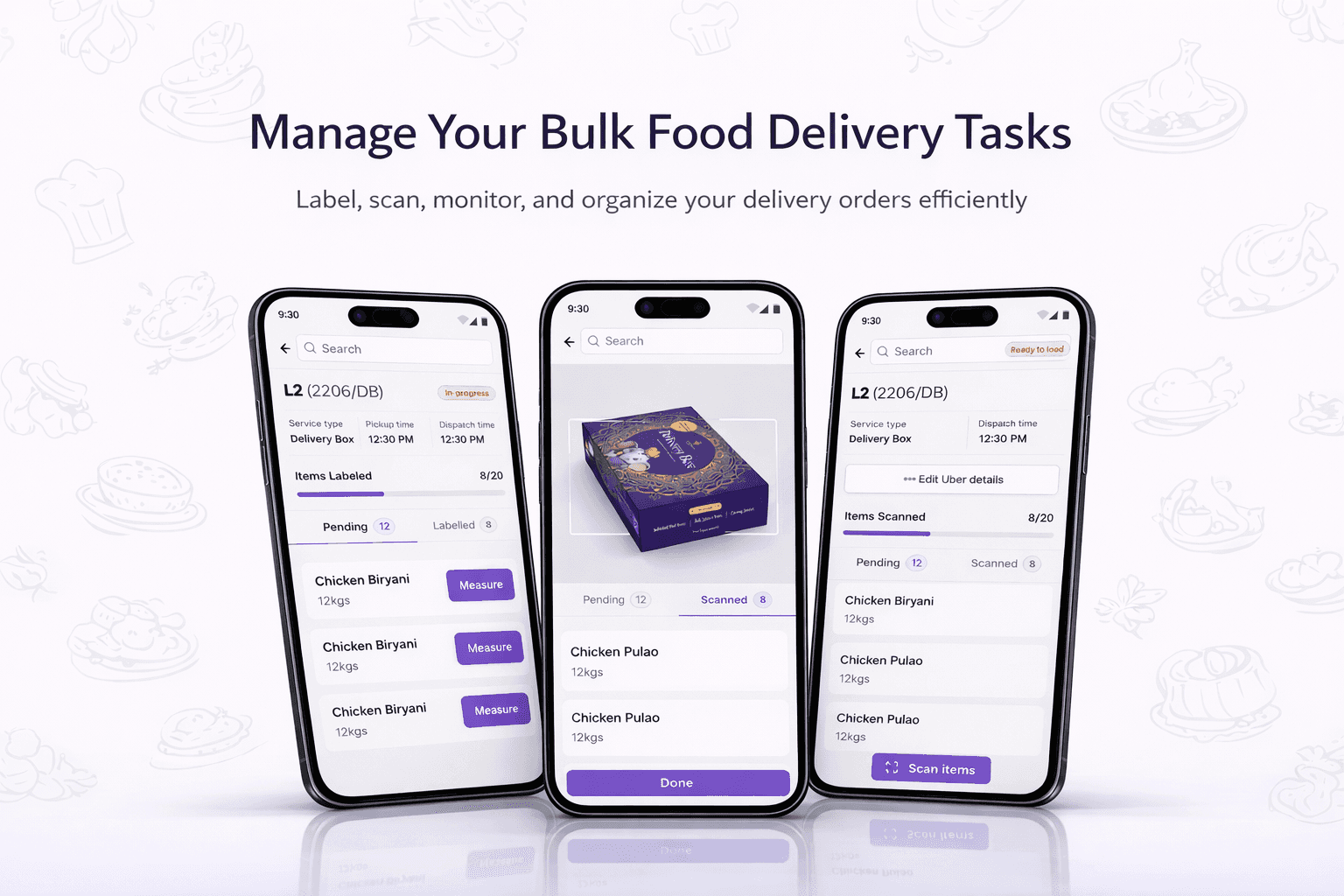
Craft My Plate (CMP) handles catering orders ranging from 10–200 people, often involving multiple kitchens, warehouses, and logistics partners. While customer-facing experiences were evolving as part of a unified platform, on-ground execution remained fragmented, manual, and highly dependent on individuals.
To solve this, we designed a unified internal operations platform consisting of:
A mobile-first execution app for Ops Executives
A real-time monitoring dashboard for Ops Managers
Together, these two surfaces create a single source of truth for order execution—reducing chaos, errors, and manual coordination.
My Role
I worked end-to-end on this product under the Design Lead and was the only designer on the project.
Responsibilities
User & workflow research
Process mapping and problem definition
UX flows & information architecture
Wireframes & high-fidelity UI
Stakeholder discussions with Ops, Product, and Founders
A key part of this project was deeply understanding real operational workflows and refining them through design, not just translating requirements into screens.
Users & Context
Operations Executives (Mobile App)
Handle on-ground execution across kitchens, warehouses, and logistics
Work in high-pressure, time-sensitive environments
Often deal with multiple orders simultaneously
Operate with average tech familiarity and low or unstable network connectivity
Operations Manager (Dashboard)
Oversees execution across all active orders
Handles escalations and final decisions
Previously acted as the single point of coordination via calls and WhatsApp.
The Problem
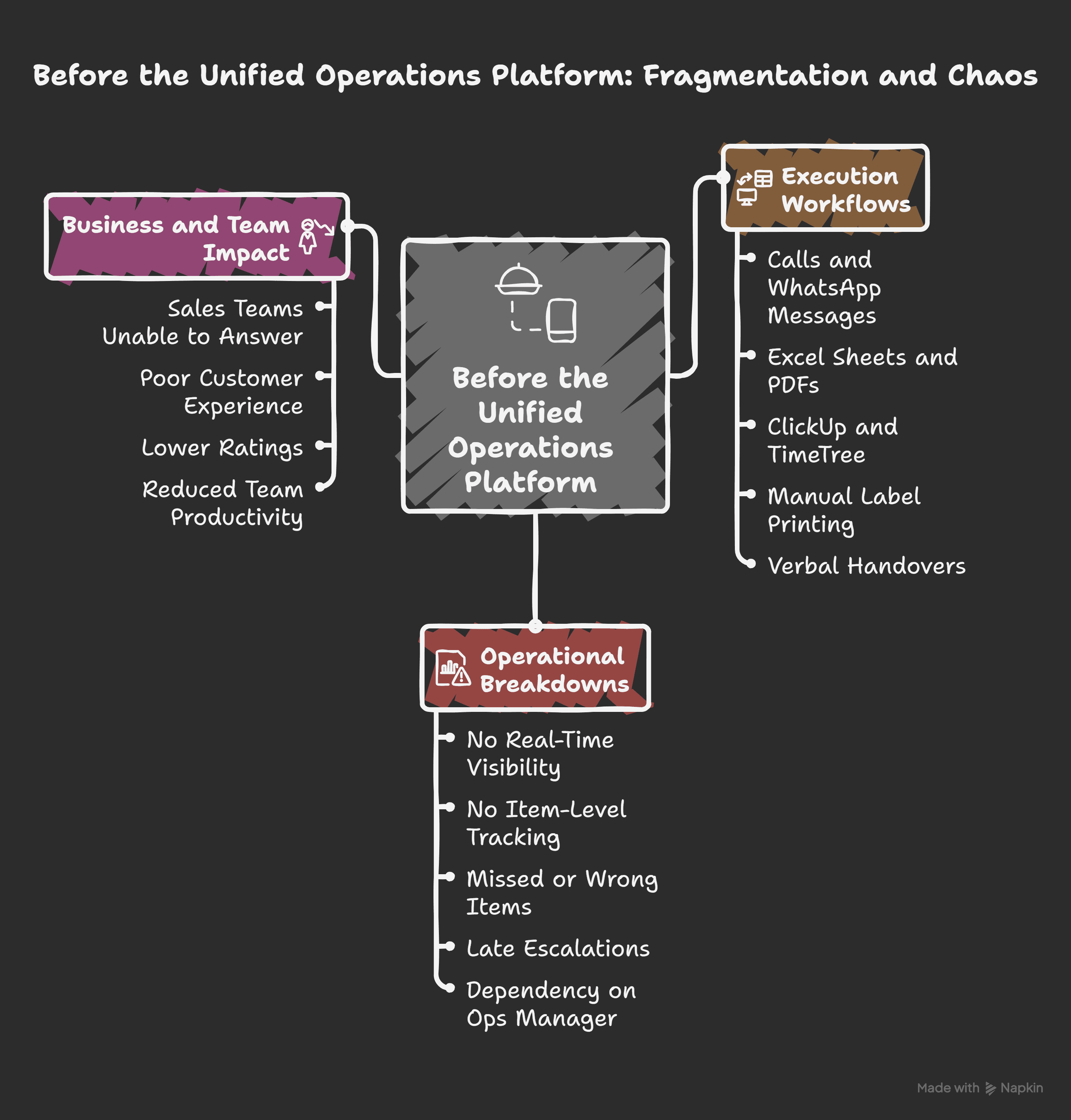
Before the Unified Platform
Problem Statement
On-ground kitchen operations teams rely heavily on manual communication to coordinate live execution, making it difficult to know what needs to be done next and leading to missed items, unclear handovers, and high dependency on Ops Managers in fast-paced kitchen environments.
The Unified System
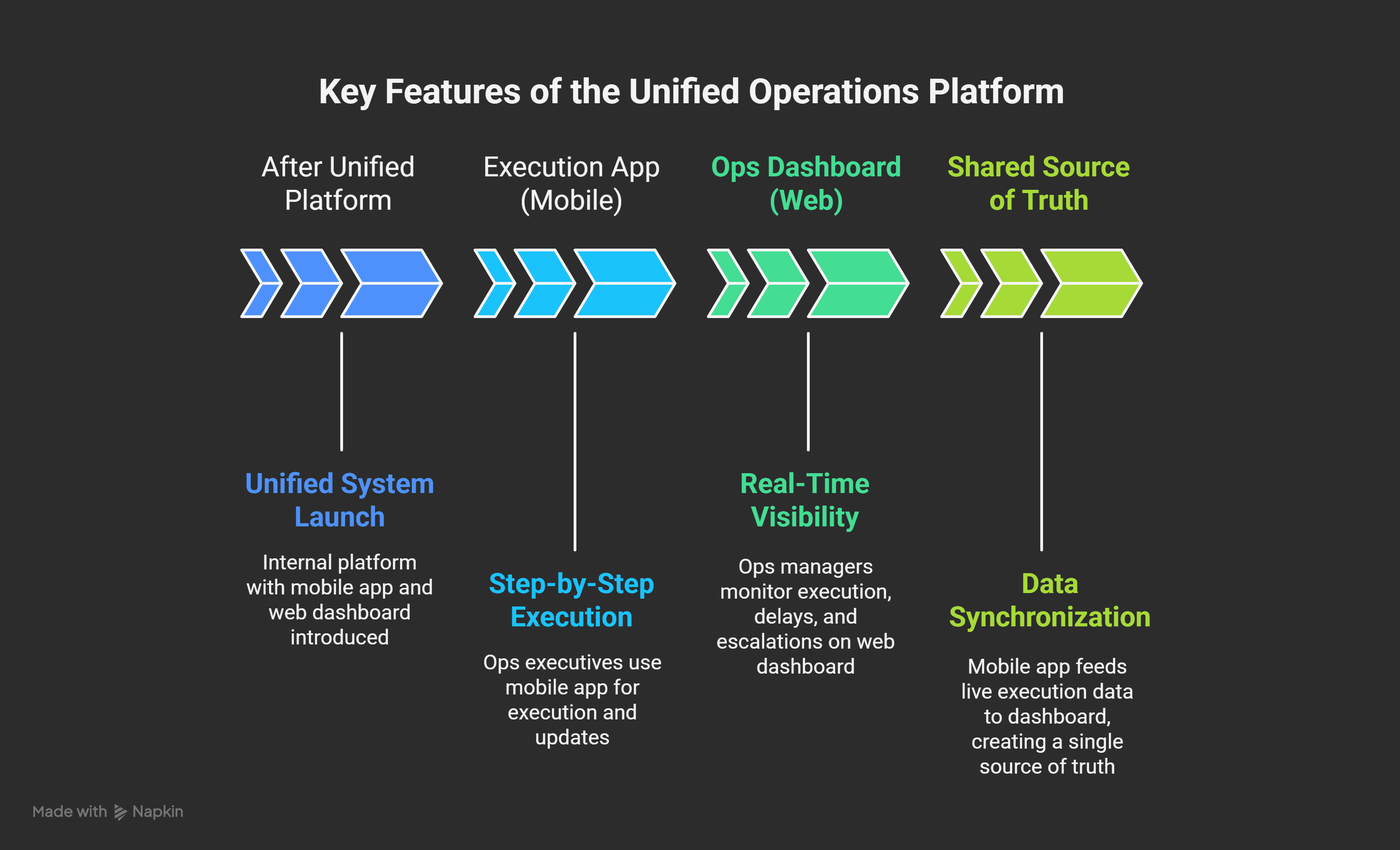
This solution was designed as one internal platform with two connected surfaces.
1) Execution App (Mobile)
2) Ops Dashboard (Web)
The mobile app feeds live execution data into the dashboard, creating a shared source of truth.
Scope & Boundaries
Included
Item-level execution tracking
Step-by-step execution flow
Status updates, scans, photos, and fail-safes
Today’s and upcoming orders only
Explicitly excluded
Sales, pricing, or menu management
Task creation
Customer-facing features
Over-automation where it slowed execution
These boundaries were intentional to keep the system fast, reliable, and focused on execution.
Execution Workflow (Mobile App)
Each order follows a non-skippable execution flow:
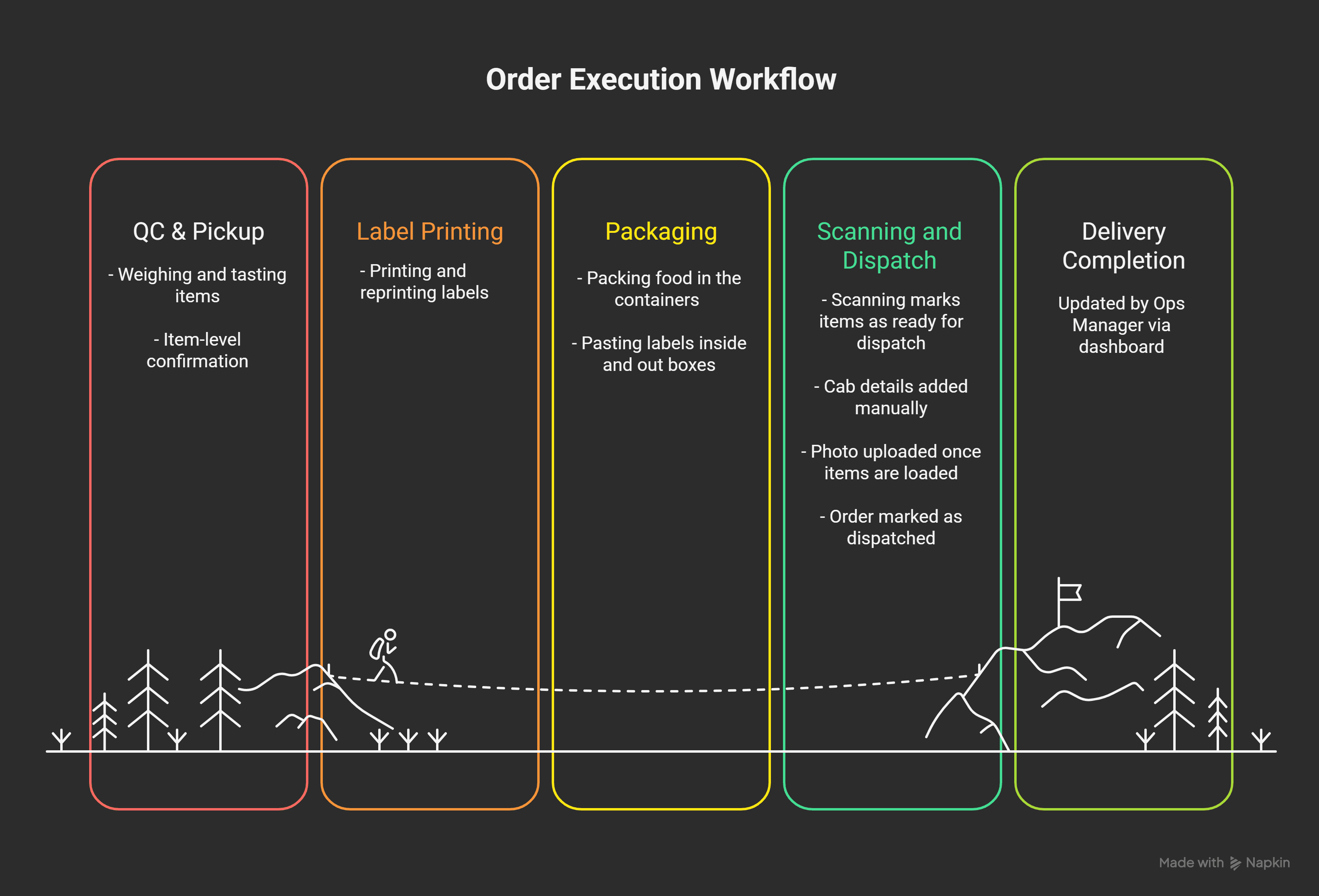
Multiple executives can handle different steps depending on scale and situation.
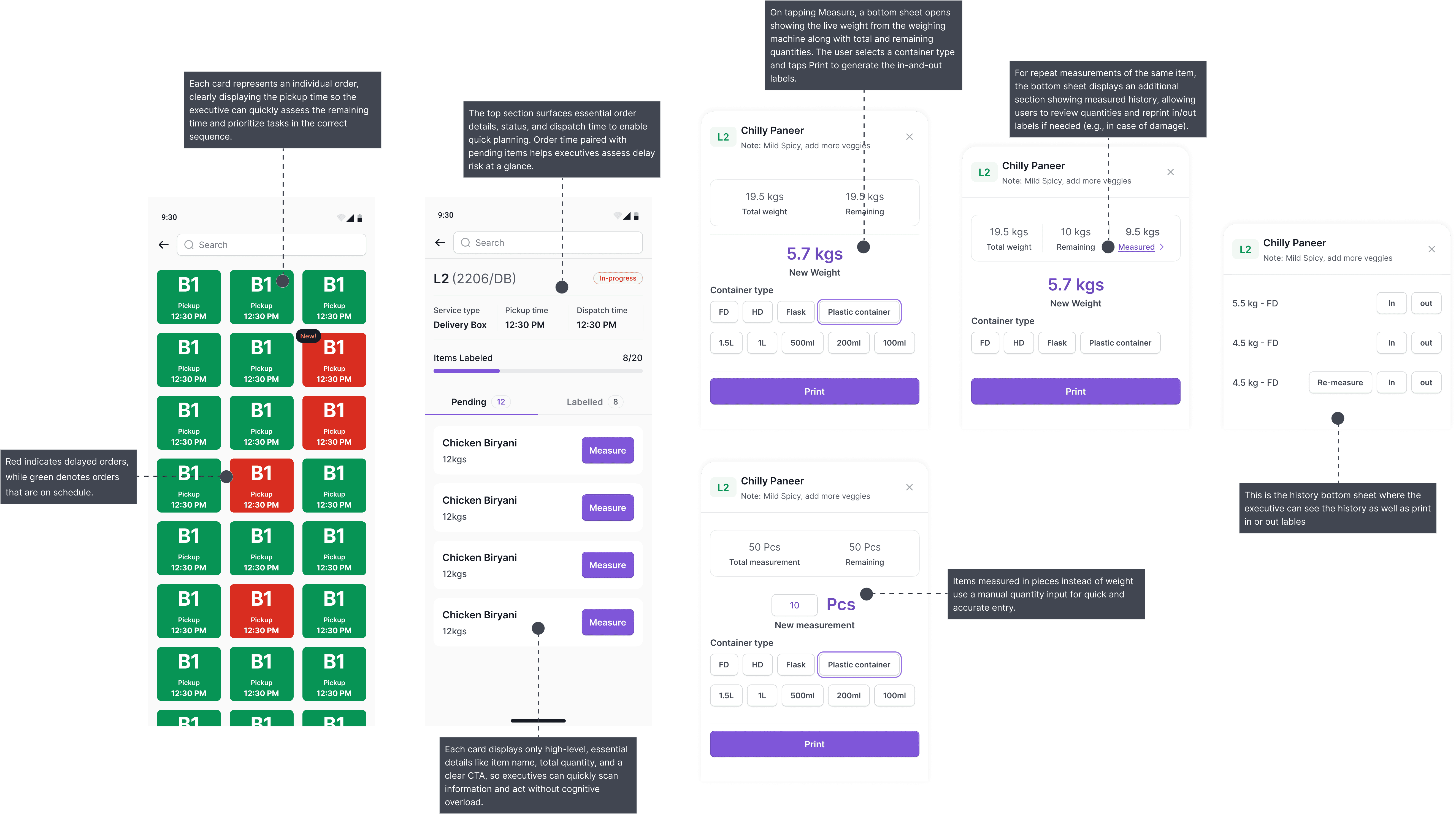
Key UX Decisions
1. Item-Level Tracking Over Order-Level
Customer complaints about missing or incorrect items revealed that order-level updates were insufficient.
To avoid overload:
Only essential item details were shown:
Item name
Quantity
Clear CTAs
This balanced accuracy with speed.
2. Reducing Flexibility to Reduce Chaos
Ops initially requested all micro-steps to be included.
This made the app cluttered and slow.
We intentionally:
Reduced repeated scanning steps
Removed non-critical notifications
Kept only steps essential for execution confidence
This trade-off improved clarity and decision speed.
Manual Where It Made Sense
Some actions (e.g. booking logistics) were kept manual because:
Ops were already efficient with existing methods
Automating everything added friction
Focus remained on execution reliability, not feature overload
Fail-Safes & Error Handling
Reliability was critical in low-network, high-pressure environments.
Fail-safe mechanisms
If label scanning fails → photo upload as backup
Offline-friendly updates that sync when connectivity returns
No silent skipping of steps
Visual confirmation ensures every item passes through the process
These safeguards reduced execution risk without slowing teams down.
Information Hierarchy
Mobile App
Today’s orders
Upcoming orders
Clear separation of:
Pick & Pack
Dispatch
Dashboard
Live view of all active orders
Clear indicators:
Green → On time
Red → Delayed
Customer and pricing details were hidden to avoid distraction.
Ops Dashboard (Monitoring & Control)
The dashboard allows Ops Managers to:
Track execution without WhatsApp or calls
Identify delays early
Gain confidence that all items have gone through the process
Reduce dependency on individual updates
It transformed the manager’s role from constant coordination to informed oversight.
Anticipated Impact & Outcomes
While exact metrics were not formally tracked, outcomes included:
Significantly fewer calls and messages
Faster execution and clearer handovers
Fewer missed or incorrect items
Reduced dependency on the Ops Manager
Teams felt more relaxed, confident, and productive
Clear assurance that “everything has gone through the process”